Business Software Solutions, Inc.

Business Plus Accounting

Providing Better Business Software Since 1989

How to Speed Up Your BPA POS Software

by BSS 26. May 2011 12:37

Have you noticed that the BPA software on your client computers are running slow?  Follow these steps:

NOTE: If you have not done this before, performing these steps may take anywhere from 5-20 minutes. 

1.  Completely close the BPA Software on all client computers.

2.  On the main Server computer, open the BPA software.

3.  Go to Files—>Pack Data Files.
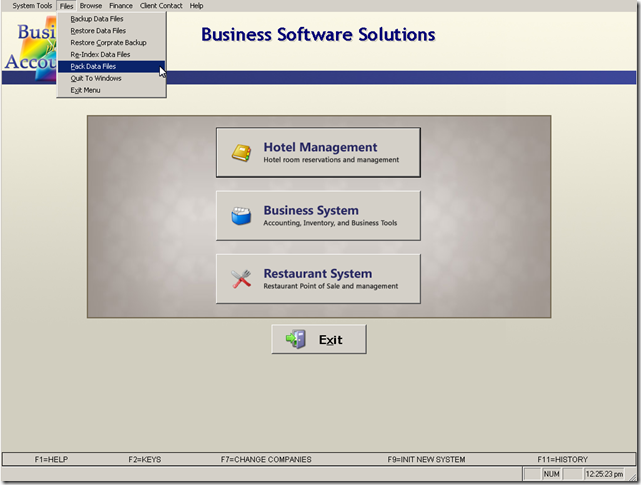
BPA POS Software maintenance


4.  The next screen will ask you to confirm that the BPA software is closed on all other computers.  Click Yes to confirm this.
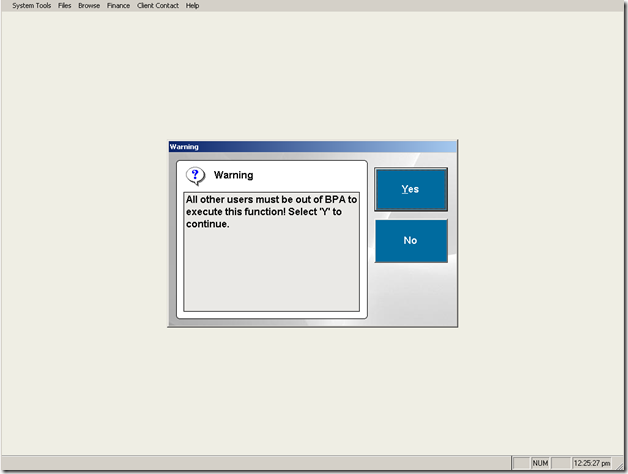
BPA POS Software maintenance


To keep your system up to speed, we recommend that you perform this at least once a week.  If you process a lot of transactions through BPA, you may want to perform this once every couple of days.

blog comments powered by Disqus

Free White Paper - Purchasing the Right POS System

We want you to be sure that the POS System you purchase will have everything you need.  This free white paper will help ensure that you purchase the best POS system for you and your company.


Download Our Free White Paper

Purchasing the Right POS System

Business Software Solutions

Business Plus Accounting is a full featured business accounting software package. We provide Point of Sale and other applications for many different industries built on top of our BPA software.  This gives us the most comprehensive set of software solutions on the market today.